
The Hidden Cost of Bad Engineering
If you think good engineering is expensive, you should see the bill on bad engineering.
This quote stuck with me because, more often than not, it’s accurate. Have you ever heard “We don’t have time to do it properly!”? Right.
Shortcuts are fine. Keeping them isn’t.
We’ve all seen our fair share of seemingly working bad software engineering,1 and we know that waiting for the perfect engineering solution won’t get projects finished on time. Waiting, in this case, means rewriting code over and over: redesigning, refactoring, making it more testable, and so on. So what do we do when we have to deliver? We take the time-critical shortcuts known as technical debt to get results. You know: “it works for this case”, “it’s hardcoded for now”, the typical fire and forget. This is natural and often there’s nothing wrong with it so far. But if it’s one of those hacks that causes more work every time that piece of code is built, linked or touched, then not taking the next step is where the mistake happens.
Once the time-critical phase is over and the deadline was met, the issues that still cost time, and therefore money, should be addressed as early as possible, unless you’re consciously willing to live with a much higher cost of maintenance, more code complexity and sometimes frustrated developers. Keeping hacks and workarounds is like an unpaid credit card bill: it creates short-term liquidity, but it won’t get cheaper.
Make time to pay it back
The best you can do is to make, not wait for, time to get back to fixing it. Keep a list of the things you want to fix, keep it prioritized, and make sure the team and the project owner have ready access to it. On the upside, keeping the list visible also gives you and your team time to think about the best solution.
Leaders: keep explaining to your team members or peers why those things need to stay around for now. If you can’t keep a straight face doing so, you know it’s past time to fix them. Developers: understand your leads when they tell you that you don’t have the luxury of a second shot at the problem, but keep bugging them about it (kindly and respectfully) if it keeps bugging you afterwards.
The rule of three
One strategy that helps is the rule of three: hack it the first time, invest the time to do it the same or a similar way the second time, and fix it for good the third time. That gives you two chances to think about how to solve an issue properly before taking a stab at the general solution. It is also the antidote to the opposite failure, premature over-architecting.
In short: the second time you meet a problem, copy the first attempt and adapt it. Start generalizing only from the third time on.
The first time, implement as if the code will never be reused, so that you have initial results quickly. Remember YAGNI, “You Ain’t Gonna Need It”. It goes hand in hand with the famous quote “The best code I ever wrote is the code I didn’t write.”
+-----------------------+
|      Project A        |
+-----------------------+
|                       |
| +-------------------+ |
| |     Module X      | |
| |   Function x_foo  | |
| +-------------------+ |
+-----------------------+
The second time: not all clones are bad. Review how it was done the first time, then copy, paste and adapt as if it had never been done before. That keeps up a sustained pace without spending time generalizing concepts that aren’t used that often. If you do find a bug common to both, fix it in both places.
+-----------------------+
|      Project A        |
+-----------------------+
|                       |
| +-------------------+ |
| |     Module X      | |
| |   Function x_foo  | |
| +-------------------+ |
|                       |
| +-------------------+ |
| |     Module Y      | |
| |   Function y_foo  | | <-- an adapted copy of x_foo
| +-------------------+ |
+-----------------------+
The third time and after, review how it was done the previous times and refactor the common code. The problem now comes up often enough that generalizing it may pay off, perhaps even as part of a whole new project.
+-----------------------+
|      Project A        |
+-----------------------+
|                       |
| +-------------------+ |
| |     Module X      | |
| |   Function x_foo  | | <-- calls xyz_foo
| +-------------------+ |
|                       |
| +-------------------+ |
| |     Module Y      | |
| |   Function y_foo  | | <-- calls xyz_foo
| +-------------------+ |
|                       |
| +-------------------+ |
| |     Module Z      | |
| |   Function z_foo  | | <-- calls xyz_foo
| +-------------------+ |
|                       |
| +-------------------+ |
| |   Helper Module   | |
| |    xyz_foo        | | <-- extracted common function from x_foo and y_foo
| +-------------------+ |     and combined with new functionality from z_foo
+-----------------------+
Or it could look like this if a separate project enters the game:
+-----------------------+          +-----------------------+
|       Project B       |          |      Project A        |
+-----------------------+          +-----------------------+
|                       |          |                       |
| +-------------------+ |          | +-------------------+ |
| |     Module Z      | |          | |     Module X      | |
| |   Function z_foo  | |    /----<| |   Function x_foo  | |
| +---------v---------+ |    |     | +-------------------+ |
|           |           |    |     |                       |
| +---------v---------+ |    |     | +-------------------+ |
| |   Helper Module   | |    |     | |     Module Y      | |
| |    xyz_foo        | |<---+----<| |   Function y_foo  | |
| +-------------------+ |          | +-------------------+ |
+-----------------------+          +-----------------------+
The advantage of not generalizing on the second use is that factors introduced only by the third use can shape how the problem is generalized. When the same developer does all three, their brain will already have started working on possible solutions, which gives a useful head start.
A variation is to apply the rule of three again to the “and after” part: wait for another three changes before generalizing again. It becomes a kind of amortized-cost heuristic.
The one pitfall of the rule of three is that you need to keep track of how many times a code path has already been used. With a small code base and few developers that’s rarely a practical issue, but the larger it gets, the harder it is to track. Code comments help. The senior developers on the project should also have a way of tracking this that fits the team’s workflow.
Good variable naming
This question pops up time and again: what is a good variable name?
if (sigx) { /* ... */ }if (signal_x_is_set) { /* ... */ }Both variants have ups and downs, so which is better?
Size matters, usefulness matters more
Short variable names are cool, really, but not if you can’t tell what they mean from the immediate context. Break that rule and you’ll have a hard time remembering what a name means, what type it is, and so on. You’ll also be more likely to name the exact same value differently when it’s used in a slightly different context a few functions down. See for yourself: check your code from two weeks ago.
The best short names are i, j, k for indices and keys, val for temporary values, and probably a few more. But before I get criticized for this: such a name should not carry meaning beyond the loop or access scope.
int i; // declaration for one or multiple loops

for (i = 0; i < MAX_LEN; ++i) {
  // i is my index
  if ((i % 42) == 0)
    break;
}
// check i one last time immediately(!) after the loop
// e.g. if needed to check if the loop was aborted
if (i == 42) { /* ... */ }

/* ... */

// don't expect i to carry any meaning here and reuse it for the next loop
When a function grows and declarations are no longer easy to spot, or live in a different header altogether, it’s much more practical to use a name that’s slightly longer but just descriptive enough: signal_x, where x is obviously a placeholder. Depending on the context, you’ll have to judge whether signal_x or signal_x_is_set is the better choice. Ask a peer to explain the meaning of the shorter variant. If they get it right, that’s a good sign it’s good enough.
Use unit suffixes
In some languages, some units are implicitly standardized. In Python, for example, timeout durations, runtime measurements and timestamps are mostly floats in seconds, so the unit need not be spelled out when it matches that expectation.
When the unit is not clear, it makes sense to include it: v_mph. Since v is common for velocity in physics, I prefer it over “speed”, and the unit suffix describes the semantic content. Velocity could just as well be in kph or meters per second, hence the explicit suffix.
Other suffixes I use:
- Time:
_hfor hours,_sor_secsfor seconds,_msfor milliseconds,_nsfor nanoseconds - Throughput:
_bpsfor bits per second,_baudfor symbols per second - Velocity:
_kphfor kilometers per hour,_mphfor miles per hour
There’s no general rule, but putting some thought into variable names makes developers more productive and improves overall code quality.
State diagrams: define before you build
Before diving into development, it is crucial to have a clear understanding of the system’s behavior. That goes beyond writing lines of code: it means understanding how the system responds to various inputs and events. Much too often I see developers diving into solving a problem before its scope has been properly defined. That leads to missed timelines, because code ends up being rewritten unnecessarily.
Diagrams as visualizations
State diagrams serve as a blueprint: they show the possible states of the system and how it transitions between them. A clear definition takes some time, but it’s usually well worth the investment. It streamlines development, and it also helps during debugging, serves as documentation for onboarding new team members, and is a reference when implementations need to be validated.
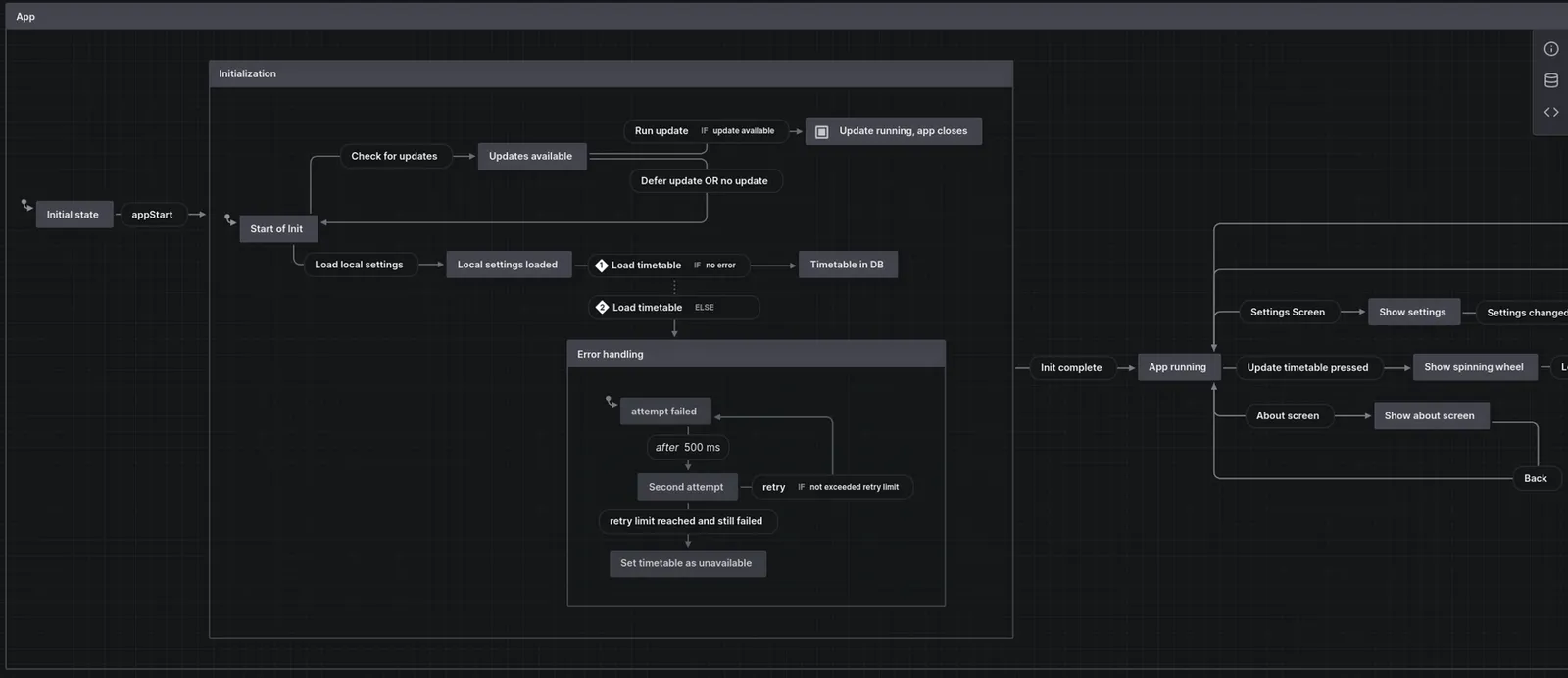 stately.ai lets you draw state diagrams or represent them in JSON.
Readable by non-programmers
One of the biggest advantages of state diagrams is that non-programmers can read them. Developers are well-versed in programming languages and technical jargon, while project owners and external stakeholders may have little or no programming knowledge, but they’re the ones who understand the problem and how it should be solved. State diagrams give both sides a common language, letting stakeholders see the system’s behavior without having to decipher code.
That bridge between technical and business logic makes state diagrams a valuable asset. It enables communication and collaboration between developers, project owners and external stakeholders, keeps development aligned with the stakeholders’ requirements, improves error handling and testing, and makes for a smoother development process overall. Give it a try: if you haven’t seen one in a while, ask your developers for a state diagram before they start coding and see how it affects their work. You might be surprised.
If you’re a developer: even a simple ASCII drawing goes a long way. Better still is a single tool for the team or project, with all graphs properly labeled and kept in one place the whole team knows about and can access and modify.
So what does bad engineering cost?
Unfortunately, only you can answer that, but here are some hints. Do you follow practices that get rid of technical debt? Have you asked your engineers where, and how much, time they keep losing? At worst, have people quit in frustration? If you’d like a neutral look at your processes from someone who will ask around, get in touch.
Engineering is indeed an art, and often the greatest achievements carry a few ugly hacks in their backpack that only insiders know about.
Footnotes
-
One of the funnier things I’ve seen in my career was a link to Google Code Search (RIP code.google.com) titled list of buffer overflows, with a regex along the lines of
malloc.*// should be big enough. ↩